|
|
|
|
 Running BAR I.F. functions
 |
|
Implementation files can define their own custom functions, which can report a wide variety of custom data to the user or perform complex, automated editing tasks. You can only call these custom functions from an I.F. view or a data file view.
For data file views, the currently selected node in the node browser determines the member function scope for member functions. All member functions of this construct type are populated in the combo box. For I.F. views, only global functions are available, because no nodes actually exist for such a view to serve as a basis for member function execution. If no member functions exist for a data file's selection in the node browser, you can only select global functions. If you have called a function before, you can call the same function again, with the same arguments, with the keyboard shortcut Shift+F8. You cannot use the keyboard shortcut to re-run a member function on a different construct type, since that type likely has completely different member functions. Argument edit controls use the subnode value-entry parsing rules. You can "prime" global variables of an I.F. view, as long as
the view is compiled, by running global functions using this dialog box.
Some advanced implementation files might require you to enter mode-selection
data or even a password before attempting
deserialization. An I.F. is quite powerful if it can perform customized
deserialization or serialization depending on custom inputs the user provides. Return values to the function, if any, are reported in the log. The type of information reported depends on the return type of the function called. I.F. functions can modify the node browser's selection and/or modify data. A well-documented I.F. will detail the inner workings on each I.F. function and how it is meant to be called by the user. I.F. functions cannot access the disk, access a network, or otherwise engage in malicious activity. The I.F. script format is controlled very tightly, preventing errant or malicious code from inflicting system damage. This is one of the many benefits of the BAR engine: function security is built-in.
See also: [Compiling BAR implementation files] [Running BAR interfacial functions] [File revalidation]
|
|
|
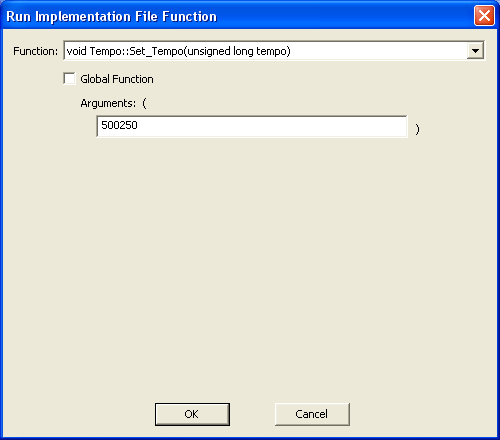 To invoke the implementation-file
function dialog box, select Run.Run BAR I.F. Function from
the menu or press F8. You are presented with a combo
box that selects the function to call, and depending on how many parameters the
function has, anywhere from zero to ten controls for entering arguments to
pass to the function. You also have a check box for distinguishing
between the list of global functions and the list
of member functions.
To invoke the implementation-file
function dialog box, select Run.Run BAR I.F. Function from
the menu or press F8. You are presented with a combo
box that selects the function to call, and depending on how many parameters the
function has, anywhere from zero to ten controls for entering arguments to
pass to the function. You also have a check box for distinguishing
between the list of global functions and the list
of member functions.